Palette templates
Palette templates are a feature for saving palettes you use often and reusing them when creating a new canvas.
Saving a template
There are two ways to save a palette as a template.
- With a canvas open, choose
Save Palette as Templatefrom the kebab menu of the Palette panel. - Open the management window and click
Add from Canvas.
Template management window
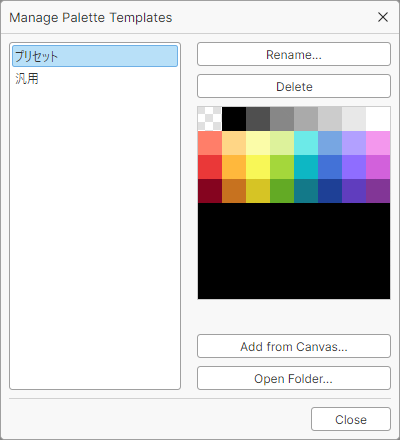
Open the template management window from Settings > Manage Palette Templates in the menu bar.
The left side of the window lists the saved templates.
Buttons
- Rename
- Renames the selected template. Names must be unique.
- Delete
- Deletes the selected template.
- Add from Canvas
- Saves the palette of the current canvas as a template.
- Open Folder
- Opens the folder where palette templates are saved.
Tip
Palette templates are just PNG files, so you can also edit them directly in File Explorer.
An image is recognized as a template if it meets the following conditions.
- Format: PNG
- Width: 1px to 255px (255 colors, excluding the transparent color)
- Height: 1px